
In the previous post we covered Azure IoT Hub: what it is, what it does, and why everything in an Azure IoT solution runs through it. Once data arrives in IoT Hub, the next question is: where does it go from there?
The answer depends on what you need to do with it. And that’s what the three-path architecture is about.
Not all data has the same urgency #
Imagine a temperature sensor on an industrial machine. It’s sending readings every few seconds. Most of the time, those readings are completely unremarkable. You want to store them for historical analysis, sure. You might want a dashboard that shows the current trend. But you also want to know the instant the temperature crosses a critical threshold, so you can alert someone before the machine breaks down.
These three needs, storing everything, monitoring trends, and reacting immediately, have very different requirements. Storing everything doesn’t need to be fast; it just needs to be cheap and reliable. Monitoring trends needs data within seconds. Reacting immediately needs it in near real-time.
That’s why the architecture splits into three paths.
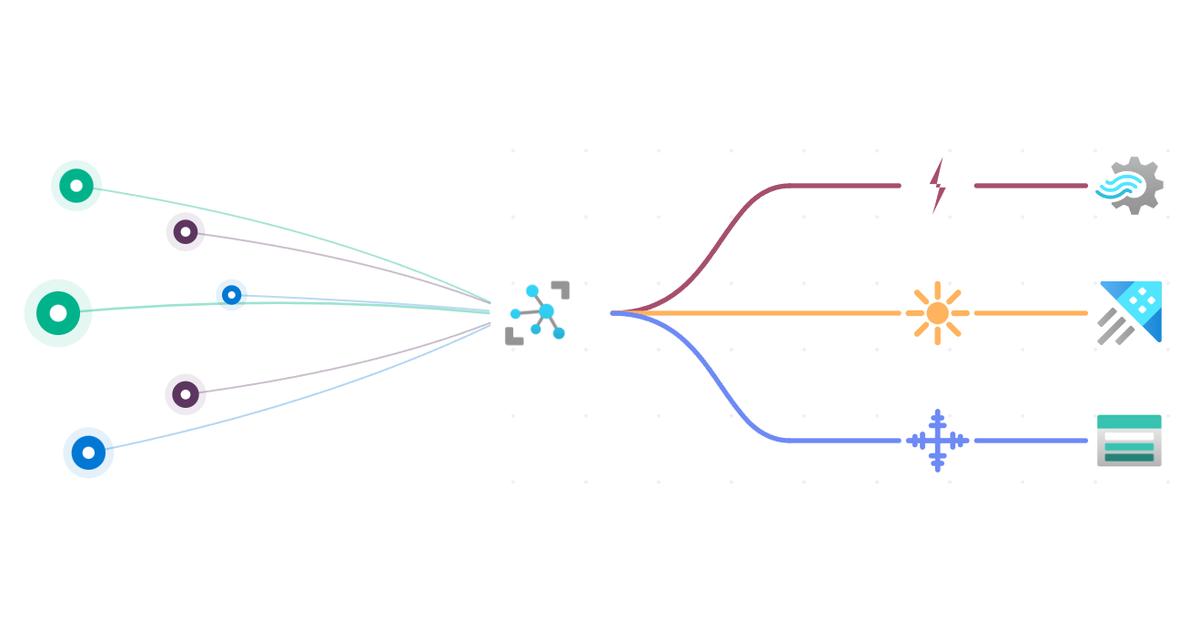
The three paths #
The same message coming out of IoT Hub can be duplicated and sent to multiple paths at once. The paths are not mutually exclusive.
Cold path #
The cold path handles bulk, non-time-critical data. Its job is to store everything, exactly as the device sent it, for as long as you need it.
Use cases: historical analysis, audit trails, machine learning training data, compliance archiving. You’re not looking at this data now; you’re making sure it’s available when you need it later.
A few things define the cold path:
- High latency is fine. Data might be written in batches every minute. That’s acceptable.
- Raw data is preserved. The original message is stored untouched. You never want to modify source data.
- Long-term storage. We’re talking months or years. The cost per GB needs to be low.
- Not for real-time use. If you want to query cold path data, you typically run a batch job, not a live dashboard.

Several Azure services can serve the cold path. For this series, we use Azure Storage Account: it’s cheap, highly scalable, and natively supported as an IoT Hub routing endpoint. Messages are stored as raw JSON files in blob containers, batched at a configurable interval.
Warm path #
The warm path sits between cold and hot. It’s designed for data that needs to be available within seconds, not minutes, but doesn’t require instant action.
Use cases: monitoring dashboards, trend analysis, detecting patterns over the last few hours. The warm path answers questions like: “What has the temperature been doing over the last 30 minutes?” or “How many alerts did device X trigger today?”
What defines the warm path:
- Low latency. Data flows continuously without batching. It’s available within seconds.
- Mid-term storage. Data is kept for a defined retention period (days or weeks), then automatically deleted.
- Optimized for querying. The warm path is not just storage; it’s also an analytics layer. You query it directly.

For the warm path in this series, we use Azure Data Explorer (ADX). It’s a strong fit because it handles ingestion, storage, and querying in one service, and it’s purpose-built for time-series data. You query it using KQL (Kusto Query Language).
Hot path #
The hot path is about speed and immediate action. Its job is to detect critical conditions in near real-time and trigger a response before a person even has time to notice.
Use cases: real-time alerts, automated notifications, triggering shutdowns or failovers based on a threshold.
What defines the hot path:
- Near real-time. Processing happens in milliseconds to seconds after the message arrives.
- Action-oriented. The point of the hot path is to analyze and act first.
- Storage is optional. In some hot path implementations, data is not stored at all. It’s processed and discarded.
- Threshold and anomaly detection. The hot path doesn’t process every reading; it evaluates the stream and acts only when a condition is met.

For the hot path in this series, we use three services in sequence: Azure Stream Analytics detects the condition using a SQL-based query, Azure Event Hub acts as a high-throughput message buffer, and Azure Logic Apps sends the actual alert (email, SMS, Teams message, or whatever the use case requires).
All three paths mapped to Azure services #
Here’s the full picture:

One message, multiple paths #
A key point worth emphasizing: a single message from a device can travel all three paths simultaneously. IoT Hub’s message routing lets you define multiple routes, and each route evaluates independently. If a message matches multiple route conditions, it gets forwarded to all matching endpoints.
So the same temperature reading might be stored in Azure Storage for archiving, streamed into Azure Data Explorer for the monitoring dashboard, and evaluated by Stream Analytics for threshold detection, all at the same time.
You choose which paths a message goes to based on routing queries. A message might go to some paths by default, and only to others when a specific value or property in the message matches a routing condition.
Do you need all three paths? #
No. The three-path model is a pattern, not a requirement. Which paths you implement depends on what you actually need.
A simple data collection scenario might only need the cold path. A monitoring dashboard without alerting might only need warm. A real-time alerting system without long-term archiving might only need hot.
That said, in most production IoT solutions, you’ll end up with at least cold and warm, with hot added for critical monitoring. The architecture shown in this series covers all three because that’s the complete picture; but every path is independently useful.
What’s coming next #
The next few posts in this series each focus on one part of this architecture in detail. Before we get to storage and analytics, there’s a detour worth making: IoT devices themselves. The next post looks at what types of data they send and why MQTT and AMQP are the preferred protocols over HTTP, even though HTTP works and is supported. Message queuing, automatic retry, bandwidth, and energy efficiency all play a role.
After that, we’ll go through message routing in IoT Hub, then the cold path, warm path, and hot path each in turn.